
Hedgewood School
Be nice. Work hard. Be happy
Computing and Online Safety
We centre our teaching on preparing pupils for life beyond the classroom by equipping them with the skills to make choices and gain greater control over their lives. Computing and technology are viewed as essential tools for inclusion, with the right support, every child can purposefully use technology to access the wider curriculum and fully participate in learning, whatever their individual needs.
Additionally, we ensure all children have access to the same rich Computing curriculum, with content adapted and scaffolded so everyone can join in and succeed. Our approach uses multisensory learning methods to engage pupils with varying needs, alongside play-based exploration and structured teaching techniques (such as TEACCH visual supports and focused learning) to accommodate different learning styles. Ultimately, we want our pupils to be happy and enthusiastic users of technology who are confident, independent, and creative in its use.
Our Computing curriculum covers the full breadth of the national Computing programme of study, but taught at an appropriate level for our learners. We have engineered a curriculum that is both ambitious and adapted, covering all key areas of Computing while delivering content through engaging, hands-on experiences. Pupils develop knowledge and skills in all major strands of Computing (outlined below) through multisensory, active and focused learning experiences, ensuring they build understanding through doing. We expose students to a variety of software, devices and resources to provide a range of appropriate challenges and experiences, increasing their engagement and allowing them to extend their learning when ready. High expectations and tailored support mean that learners are continually encouraged to extend and challenge themselves within a safe and supportive framework.
Curriculum Strands: Our Computing curriculum is structured around five key strands, reflecting both the national curriculum and the needs of our pupils. Each strand is introduced with simple, accessible activities and revisited in greater depth as children progress, allowing knowledge and skills to spiral and deepen over time. The strands and their focus are:
- Computer Systems and Networks: Understanding what computers and devices are, identifying hardware and software, and exploring how technology in our world is connected. Pupils learn about basic computer parts and how devices communicate with one another (for example, recognising that classroom computers, tablets, and interactive whiteboard screens can all link to the internet or each other).
- Creating Media: Using technology to create and edit digital content. This includes learning to use various devices and apps to record sound and video, take photographs, draw pictures, and manipulate text or images. Pupils have opportunities to be creative, for instance, making a simple digital art project, recording their voice with a microphone, or assembling a slideshow of pictures, thereby understanding that computers can be tools for art, music, and communication.
- Programming: Learning how to give instructions to computers in order to make something happen. Pupils discover that computers follow sequences of precise steps (algorithms). They experiment with simple programming by inputting instructions, for example, pressing buttons on a Bee-Bot to make it move in a sequence. As they progress, they learn to create and debug simple programs (such as dragging coding blocks in ScratchJR) to solve problems or achieve goals. We also use the Code-It planning resources as a guide for staff to introduce coding concepts in a structured, pupil-friendly way.
- Data and Information: Learning how to collect, handle, and make sense of information. Pupils practice sorting and grouping objects (unplugged and on devices) and learn that computers can help us store, organise, and display data (like making a pictogram or chart of the class’s favourite fruits). They begin to understand how information can be recorded and retrieved using technology, laying the groundwork for later data skills.
- Digital Literacy & Online Safety: Developing the knowledge and habits to use technology safely and responsibly. From the earliest years, pupils are taught about the benefits and risks of being online – for example, keeping personal information private, being kind in online interactions, and knowing to ask an adult if they see something confusing or upsetting. Our online safety curriculum is guided by the UK “Education for a Connected World” framework, and we utilise ProjectEVOLVE training provider to keep teachers’ knowledge up-to-date with the evolving digital landscape. All staff receive regular training in e-safety, ensuring they are equipped with the knowledge to support and protect our pupils as technology and online trends develop. By embedding digital citizenship education throughout the curriculum, we help pupils become digitally resilient and aware of how to keep themselves and others safe online.
Pupils get hands-on experience with desktop computers and interactive touchscreens, tablet devices (iPads), digital cameras, and even game consoles, as appropriate. They experiment with simple programmable toys like Bee-Bots and other cause-and-effect gadgets, for instance, toys that light up or make sounds when interacted with, to experience technology in a tactile, engaging way. We also incorporate tools like microphones and switches to enable all learners to interact with digital content. By leveraging this range of equipment, we give students concrete, enjoyable experiences of computing concepts and allow every child to find a way to engage.
We encourage and enable all children from a young age to learn and practice good habits when using technology. Our children and young people do not always have the skills to ‘self-regulate’ how they use technology / internet services and therefore are never left unsupervised at school.
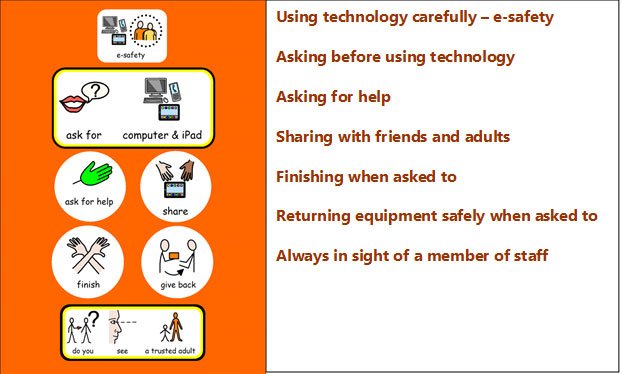
Please click on Online safety at Home to find more information to support your child to stay safe online.